> For the complete documentation index, see [llms.txt](https://docs.oortech.com/oort/llms.txt). Markdown versions of documentation pages are available by appending `.md` to page URLs; this page is available as [Markdown](https://docs.oortech.com/oort/oort-storage/getting-started/user-guide/create-a-bucket.md).
# Create a Bucket
Create a Bucket to Store Your Data
After you’re signed in to OORT Storage, you can create a storage bucket in the OORT console. If you’re not signed in, please see [User Guide-Sign up](/oort/oort-storage/getting-started/user-guide/sign-up.md).
{% hint style="info" %}
You will not be charged for creating a bucket. Only storing objects in the bucket and transferring objects in and out of the bucket will be billed.
For more information about storage charges, see [OORT Storage pricing](/oort/oort-storage/getting-started/billing-and-pricing/pay-as-you-go-pricing.md).
{% endhint %}
## Step 1: Create a Bucket
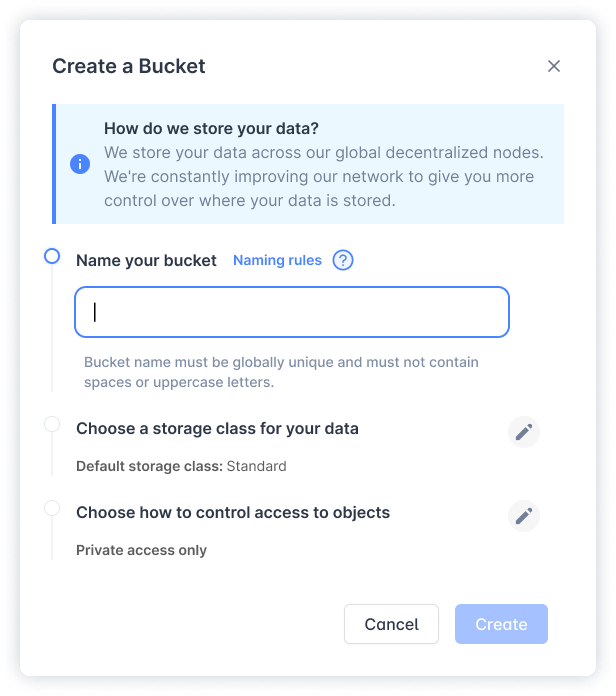
On the sidebar, select the **`Buckets`** tab and click **`Create Bucket`**.
## Step 2: Name your bucket
Bucket name must be globally unique and must not contain spaces or uppercase letters.
{% hint style="warning" %}
You cannot change a bucket's name once you create it.
For information about naming buckets, see [Bucket Naming Rules](/oort/oort-storage/manage-storage/work-with-buckets.md#bucket-naming-rules).
{% endhint %}
## Step 3: Choose a storage class for your data
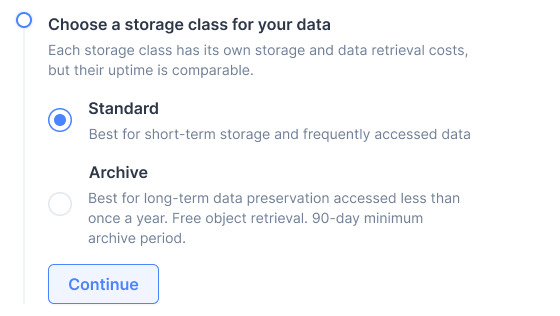
At OORT Storage we offer two distinct storage classes: archive and standard. The main difference between these two classes is their intended use case.
**Standard storage** is designed for frequently accessed data that requires low-latency access, whereas archive storage is optimized for infrequently accessed data that can tolerate longer retrieval times.
With **archive storage**, users can take advantage of lower storage costs while still maintaining the security and durability of their data.
## Step 4: Choose how to control access to objects
At OORT Storage, we understand the importance of controlling access to your data. With our platform, you can easily set access permissions for each bucket to ensure that only authorized users can access, download, or write to the contents of the bucket.
**By default, all buckets are set to private access only**, which means that only users with the appropriate permissions can access the contents of the bucket.
However, if you need to host a website using the contents of the bucket, you will need to **enable public access**. When you choose to allow public access, anyone on the internet can read or write objects in the bucket. We advise our users to exercise caution when making a bucket public, and to ensure that only the necessary objects are made accessible to the public.
{% hint style="info" %}
OORT Storage recommends that you **disable** all public access, but before applying any of these settings, ensure that your applications will work correctly without public access.
{% endhint %}
## Step 6: Your bucket is ready!
Click the **`Create Bucket`** button and continue to the next step.
### **Next step**
{% content-ref url="/pages/cOB1JoV4JtP0aoGib7Er" %}
[Upload an Object](/oort/oort-storage/getting-started/user-guide/upload-an-object.md)
{% endcontent-ref %}
### More about buckets
{% content-ref url="/pages/w2us0JwsgBB2iw2kaMgn" %}
[Work with Buckets](/oort/oort-storage/manage-storage/work-with-buckets.md)
{% endcontent-ref %}